
Appearance
Your logbook
The Logbook tab is your diving history. Five sub-tabs across the top: Dives, Map, Gallery, Requests and Stats.
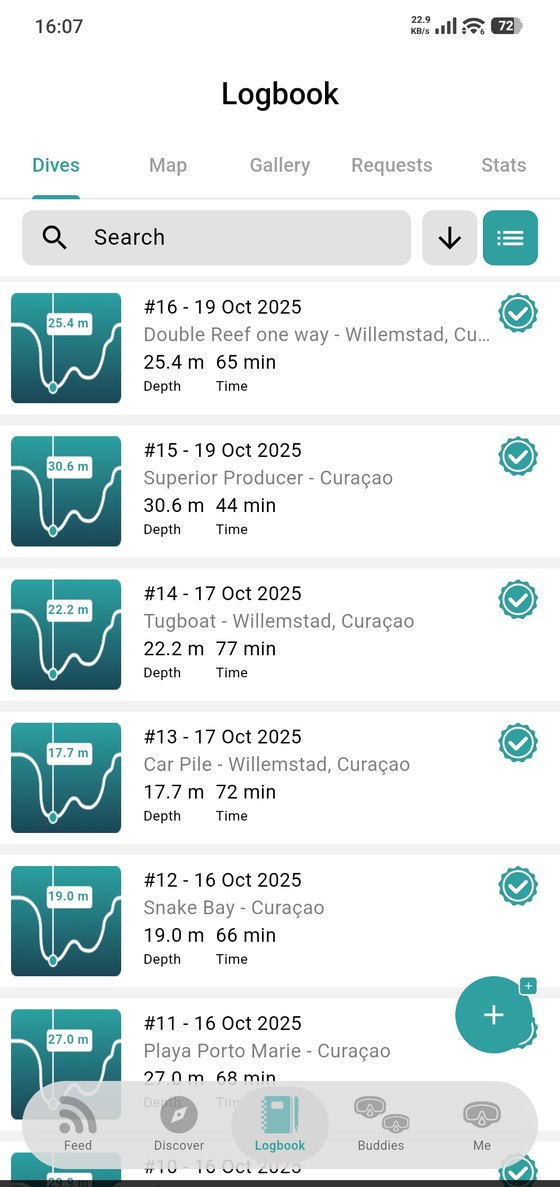
The dive list
Each row is one dive: its number, the date, the site and where it is, then max depth and dive time. A teal check means the dive is verified.
Up top you can search, change the sort order and switch between the list and a card view. The + button at the bottom right adds a new dive.
Requests
The Requests tab is where certification requests land — both the ones you've sent to someone and the ones other divers have sent you asking you to confirm a dive you did together.
The rest of the tabs
- Map — your dives pinned where they happened.
- Gallery — every photo you've posted, newest first.
- Stats — what your diving adds up to.