
Appearance
The client book
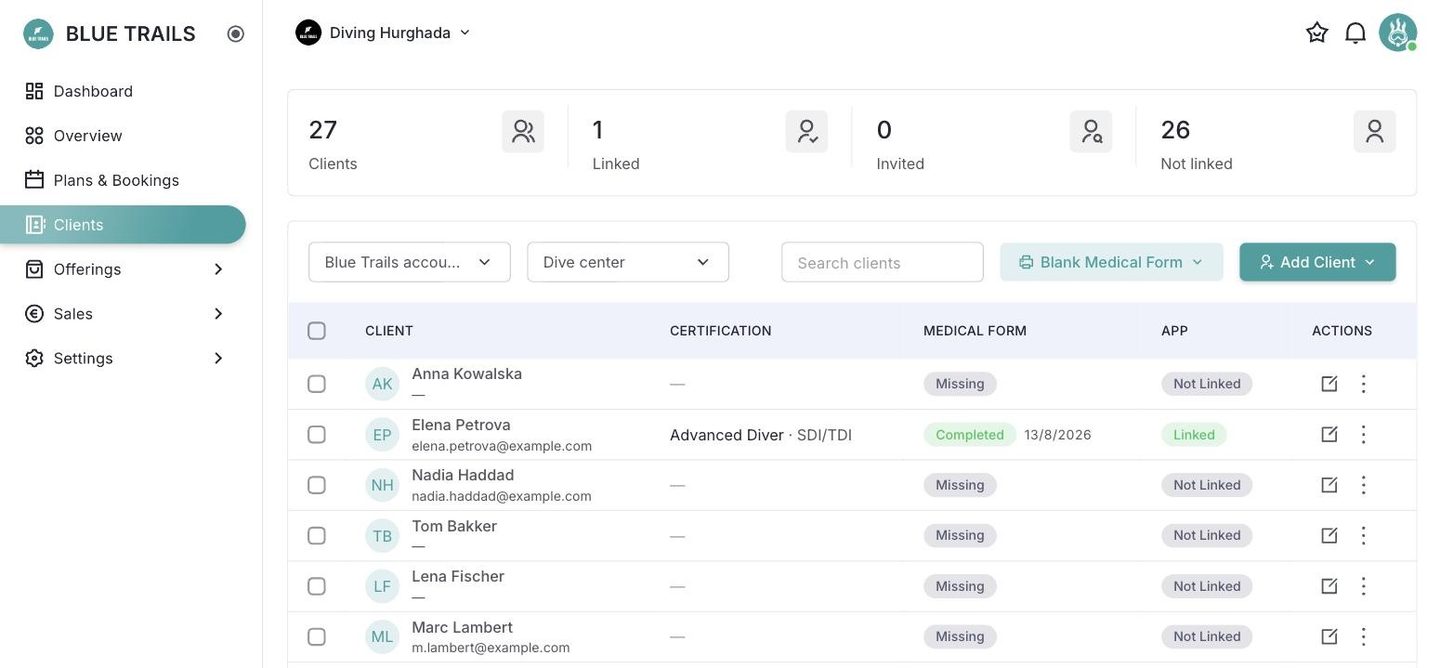
The client book is your list of divers — everyone you can book onto an activity, whether or not they use the Blue Trails app. Open Clients from the sidebar.
It belongs to the account, not one center
The book is shared across your whole business. A company running several centers keeps one client list; the portal takes care of who can see what by role, so a manager only sees the divers who passed through their centers.
What the list tells you
For each diver you see, at a glance:
- Certification — level and agency.
- Medical form — whether their health declaration is complete or missing.
- App — whether they're linked to the Blue Trails app (linked, invited, or not linked).
The four counters up top summarise the same thing across the whole book.
Filtering
Use the search box and the filters (by center, by link status) to find a diver fast, even with a long list.
Next
- Add a client — by hand or as a walk-in.
- The medical form — health declarations.
- Public sign-up by QR — let divers fill their own.
- Linking divers to the app.