
Appearance
Linking divers to the app
Divers who use the Blue Trails app can be linked to their record in your book. Linking connects the person in the app to the client you book onto activities.
The link statuses
On the client list, the App column shows where each diver stands:
| Status | Meaning |
|---|---|
| Not linked | A record you keep; the diver isn't connected in the app. |
| Invited / Awaiting response | You've invited them; waiting for them to accept. |
| Linked | Connected — their app profile and your record are joined. |
Inviting a diver
From a client's record you can send an invite. Once they accept, the diver is linked.
What you see once they are linked
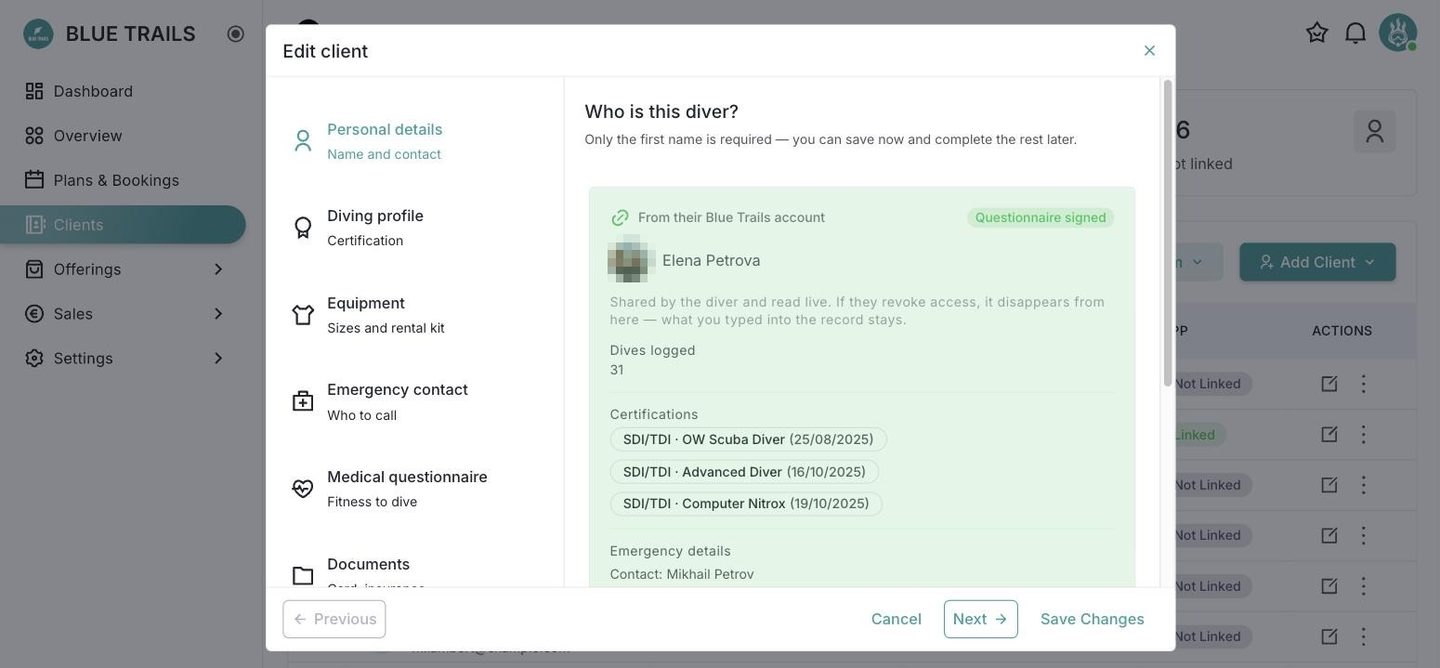
Their record grows a green panel: From their Blue Trails account. It carries their logged dive count, their certifications with the issuing agency and date, their emergency contact, and whether the medical questionnaire is signed.
Two things about that panel are worth knowing:
- It is read live, not copied. You are looking at what the diver keeps current in their app, so certifications added after the link appear on their own and you never retype them.
- If the diver revokes access, the panel disappears — but everything you typed into the record stays. Linking adds to your book; unlinking never empties it.
Why link
Less admin. A linked diver fills their own medical form and keeps their details current in the app, and it flows back to your book without you chasing anyone.