
Appearance
Send it as a PDF
From the quote preview, the Send panel opens on the side. One button puts the document in the client's inbox.
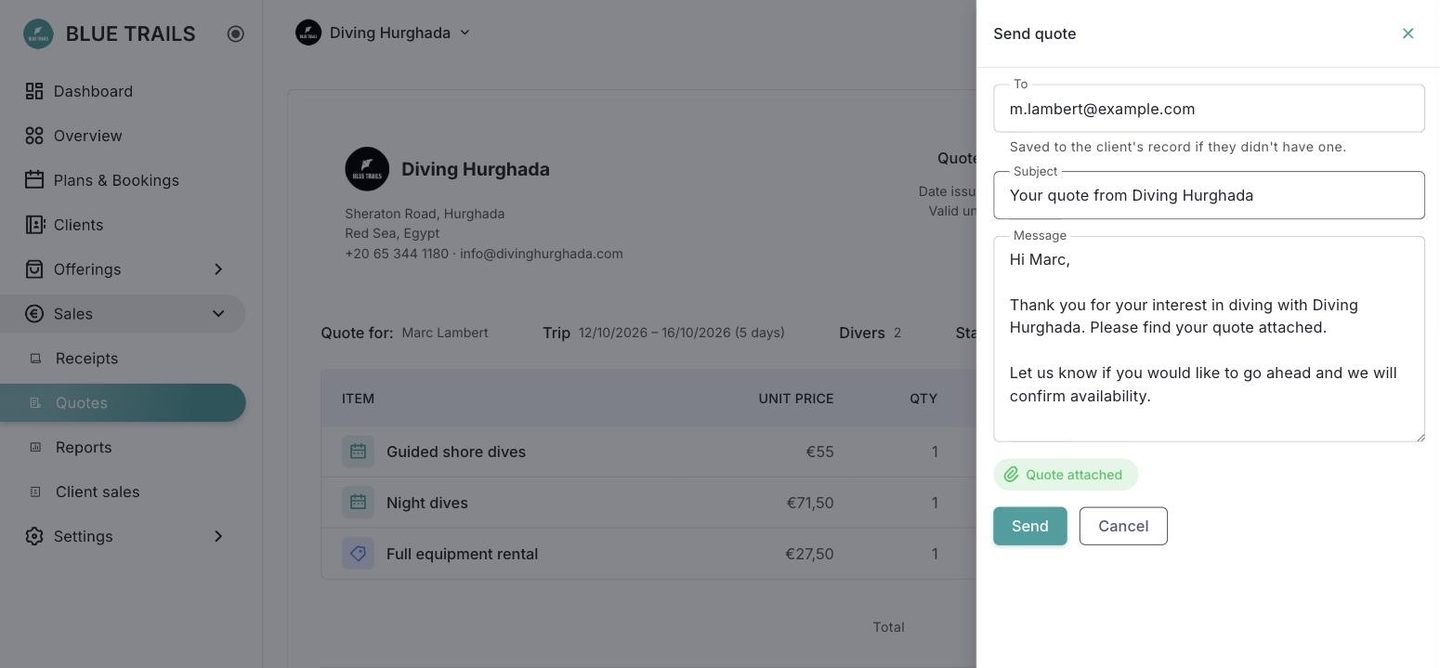
It goes as an attachment
The PDF travels attached to the email, not behind a link. The client keeps it whether or not our server is up, and there is no URL with their name and your prices sitting in a mailbox waiting to be forwarded.
It is the same PDF the preview shows. There is no second way of producing the document, so there is no second document that can drift.
Who sends it and who gets the reply
The mail leaves from Blue Trails, because your own domain is not authorised to send through this server and signing as it would land the message in spam. So:
- the visible sender reads "Your center via Blue Trails",
- your center's name is in the body,
- and the reply-to is your center, so when the client answers, the answer reaches the desk that quoted them.
There is no From field in the panel, on purpose: it would be offering a choice that does not exist.
The recipient
To comes preloaded with the client's email. If they do not have one on file, type it — and it gets saved to their record, so the next document goes out without asking again.
Subject and message
Both come filled in with your center's name and both are editable. They are rebuilt every time you open the panel, so a message you left half-written for another quote never goes out with the wrong number in it.
The greeting lives in the message
Everything the client will read is in that text box. What you see before sending is what they receive — there is no extra greeting added behind your back.
What gets recorded
The quote remembers who it went to and when, and the preview says so. It is not a history: it keeps the last send, which is what answers the question "did this actually go out?".