
Appearance
Turn it into bookings
Once a quote is approved, converting it creates the real bookings. It is a screen and not a button, because a button that silently takes eight seats is exactly the thing nobody can undo afterwards.
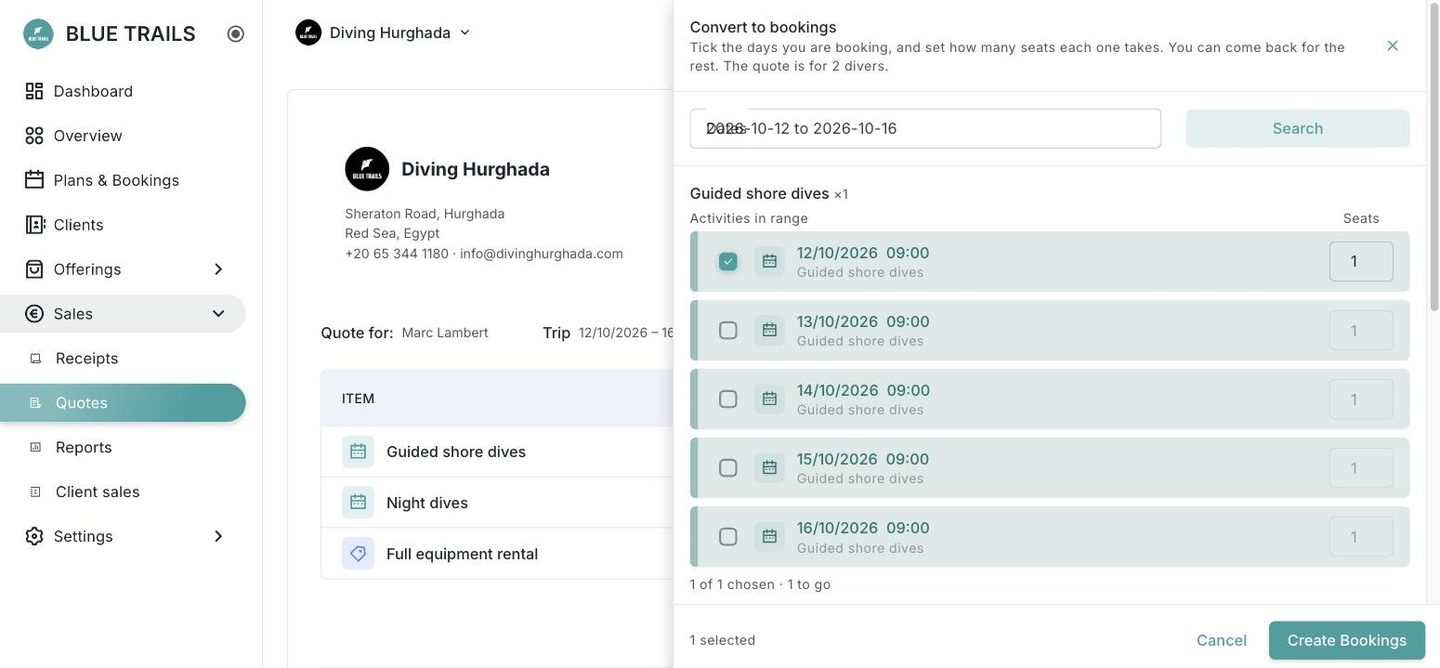
How it works
- Pick the date range. It comes preloaded with the desired dates from the quote, if it had any.
- The drawer lists the real departures in that range that match the service lines, with their time and their free seats. The same service can run at several times, and which one the group goes on is your call, not the software's.
- Tick the ones that go. Rentals sit inside the departure you chose, not next to it — a rental is not a thing on the calendar, it is gear attached to a booking, so it has to say which one. Gear priced per day is offered once per day, which is how it gets charged.
- Confirm. One booking per line, with seats and capacity resolved the same way as booking divers in.
Partial and repeatable
You do not have to convert the whole quote at once. Take the two days that already have departures today, and come back for the rest when they appear — reopening the drawer shows only what is still pending.
Converting uses your plan's quota, and can be refused
If your subscription runs out of room mid-conversion, the report tells you line by line what went in and what did not. Check it: half a converted quote is not something to discover a week later.
When there is no departure to book
Three different reasons, and none of them fixes itself:
| Why | What you can do |
|---|---|
| The date is more than 12 months out | The departure does not exist yet but it will. Leave the line pending and convert it when the date comes into range. |
| No season or schedule covers that day | It will never exist on its own. Create the activity by hand, or move the date. |
| The day is closed | Same — reopen the day or move the date. |
After converting
The bookings show up on the calendar like any other, and the preview lists them under the actions: each row opens its activity, with the color of its service, so you can check what was actually reserved against what the client asked for.
From there, the client's receipt picks the bookings up on its own — you do not build it from the quote. That is what lets the price stay current: you charge now or when the diver arrives, and either way the amount is the one in force at that moment.